How agentic workflows run: triggers, tools, and human gates

If you have read what agentic AI is, the next question is operational: how does a run actually execute inside your business? This article walks the agent loop, the three ways workflows start, what vendors mean by tools and functions, and the governance checkpoints that separate production delivery from a chat demo.

Agentic workflow = a governed sequence from triggerplan and tool usevalidationhuman gate (where required) → system of record update — with a log of every step.

The agent run loop

An agent does not produce one reply and stop. It executes a run: a bounded loop toward a defined outcome. Each iteration follows the same pattern:

  1. Load context — the trigger payload, case record, policy scope, and prior steps in this run.
  2. Plan the next permitted action — within autonomy tier and policy boundaries set for this workflow.
  3. Invoke tools — retrieve data or take action in connected systems, never from model memory alone.
  4. Validate — schema, confidence, policy fit, and completeness before the step commits.
  5. Pass human gates — mandatory review on material or irreversible actions.
  6. Update the system of record — ticket, CRM, ERP, compliance repository, or audit log.

The loop continues until the workflow reaches a completion state, escalates an exception to an accountable owner, or hits a stop condition — low confidence, scope ambiguity, or policy breach. Every iteration should be logged: what the agent attempted, which tools it called, what data it used, and who approved material steps.

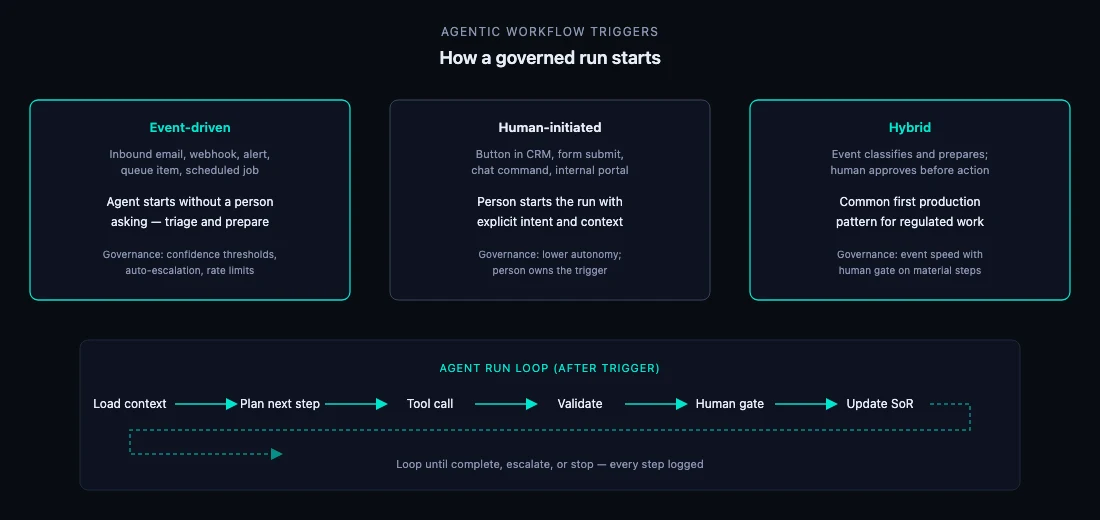
Diagram: three trigger patterns — event-driven, human-initiated, and hybrid — feeding into the agent run loop of load context, plan, tool call, validate, human gate, and system of record update.
Trigger pattern determines who starts the run; the loop structure stays consistent across governed workflows.

What an agent does in a single run

Confusion often comes from treating “agent” as a product category. In delivery terms, an agent is software assigned to progress one goal within a defined boundary. In a run, it performs four distinct roles:

  • Interpreter — reads unstructured input (email, document, alert text) and maps it to workflow state: category, urgency, missing fields.
  • Planner — chooses the next allowed step from an approved playbook, not an open-ended improvisation.
  • Tool caller — executes structured actions against your systems rather than presenting assumptions as fact.
  • Escalator — stops, flags, or routes when confidence, policy, or scope thresholds are not met.

State matters. A production workflow maintains a case record — open items, evidence links, draft versions, approval status — not just chat history. Multi-step work survives handoffs, pauses, and human edits because state lives outside the model context window.

Stop conditions should be explicit before go-live: maximum loop count, timeout, prohibited actions, and mandatory escalation paths. Without them, probabilistic systems can churn on edge cases or attempt steps outside scope.

How workflows start: three trigger patterns

The trigger is the first architectural decision. It determines autonomy, monitoring, and who is accountable when something goes wrong.

Event-driven

The workflow starts when something happens in your environment — without a person asking first.

  • Examples: inbound support email, webhook from a monitoring platform, new row in a queue, document uploaded to a shared folder, scheduled reconciliation job.
  • Best for: triage, backlog drain, alert enrichment, routine classification, evidence collection.
  • Governance: confidence thresholds, auto-escalation on low certainty, rate limits, and hard stops before customer-facing or financial action.

Human-initiated

A person explicitly starts the run with intent and context.

  • Examples: “Generate draft” button in CRM, internal portal form, chat command in a team channel, analyst clicking “Run assessment” on a case.
  • Best for: high-judgment preparation, tender and RFP section drafting, complex investigations, anything where the human owns the decision to begin.
  • Governance: lower default autonomy; the trigger itself is an audit event (who, when, on what record).

Hybrid

An event starts preparation; a human approves before material action. This is the most common first production pattern for regulated or customer-facing work.

  • Examples: email arrives → agent classifies and drafts → support lead approves → CRM updated and reply sent; alert fires → agent gathers context → security analyst approves containment step.
  • Best for: customer operations, compliance workflows, procurement, any domain where speed and control both matter.
  • Governance: event-driven efficiency on low-risk steps; mandatory human gate before irreversible updates.
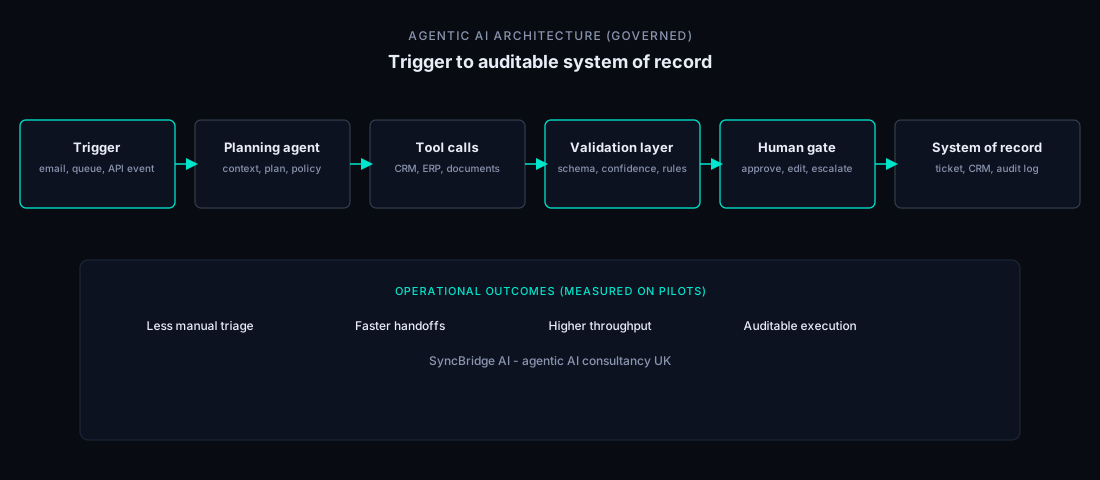
Architecture diagram: trigger, planning agent, tool calls, validation layer, human gate, system of record.
Reference stack: trigger type varies by workflow; validation and human gates sit before any system-of-record write.

Worked example: event-triggered support triage

A support inbox receives hundreds of messages weekly. Today, a person reads each one, checks the knowledge base, and either replies or routes to a specialist.

An event-driven agentic workflow might run as follows:

  1. Trigger: new email arrives in the monitored inbox.
  2. Context: message body, sender domain, open tickets for that account, SLA tier.
  3. Plan: classify intent (billing, technical, account change); check if auto-reply is permitted for this category.
  4. Tool calls: search approved knowledge base; retrieve account status from CRM.
  5. Validate: draft cites retrieved sources; confidence above threshold for category; no prohibited content.
  6. Human gate: if confidence low, account is enterprise-tier, or category is account closure — route to queue with draft attached; no send without approval.
  7. System of record: ticket created or updated in service desk with classification, draft, and agent action log.

The operational outcome is not “the model answered.” It is a classified ticket, a grounded draft, and an auditable record — with staff retaining authority on customer-facing sends. See the baseline diagram in What is agentic AI?

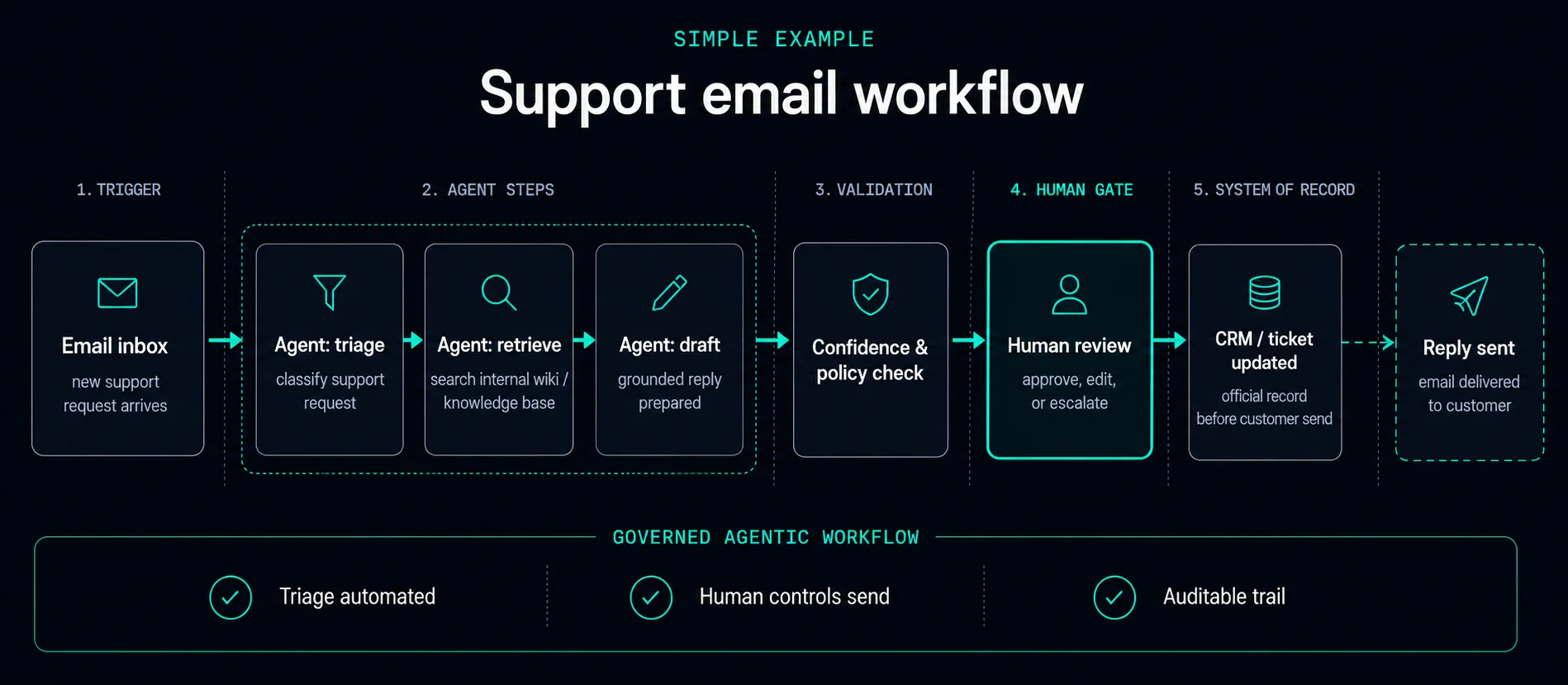
Support email workflow: inbox trigger, agent triage and draft, confidence check, human review gate, CRM ticket update, reply sent.
Event-triggered support triage: the agent prepares; accountable staff control customer-facing action.

Worked example: UI-invoked tender section draft

Tender and RFP work is typically human-initiated: nobody wants an agent submitting bids autonomously. A bid manager selects a lot, clicks “Draft technical response,” and the run begins with explicit scope.

  1. Trigger: bid manager initiates draft for Lot 2, Section 4 from the tender workspace.
  2. Context: question text, evaluation criteria, approved past responses, product factsheet, compliance constraints.
  3. Plan: retrieve relevant evidence; map requirements to response structure; flag gaps where source material is missing.
  4. Tool calls: search document library; pull certified metrics from approved datastore; check word-limit and format rules.
  5. Validate: citations present for factual claims; no uncited numbers; format matches template.
  6. Human gate: bid manager reviews, edits, and approves before export to the submission pack.
  7. System of record: draft version stored in bid repository with evidence links and approver identity.

Same agent loop — different trigger and autonomy profile. For measurement discipline on this class of work, see SME tender and RFP workload: what to measure before you automate and tender response automation.

Tools vs functions: what vendors mean

Procurement packs and platform docs often use “tools,” “functions,” and “function calling” interchangeably. In delivery, the distinction matters for governance and audit.

  • Function — the schema the model is allowed to call. Example: search_policy(query, product_line) or create_ticket(title, priority, body) with typed parameters and a description the model uses to decide when to invoke it.
  • Tool — the governed implementation behind that schema: authentication, scopes, rate limits, input validation, output normalisation, error handling, and audit logging.

A model “calling a function” is the selection step. The tool layer is what makes that call safe in production — who may invoke it, on what data, with what approval, and with what record retained.

Three practical checks when evaluating a platform or build:

  1. Can you list every function exposed to the model and disable individual ones by workflow?
  2. Is every invocation logged with inputs, outputs, timestamp, and run identifier?
  3. Are high-impact tools behind human gates or hard-coded policy checks — not model discretion alone?

Function calling without a tool layer is a demo. Function calling with validation, gates, and logging is workflow automation. See AI workflow automation for how we structure this in delivery.

Three questions before you build or buy

These questions cut through vendor labelling — whether the product is called an agent, assistant, or copilot:

  • Which system of record gets updated? If the answer is “none” or “a spreadsheet sidecar,” you have a drafting aid, not an operational workflow.
  • Who approves irreversible steps? Customer sends, financial postings, security actions, and contractual commitments need named accountability — not optional review.
  • What is logged? A defensible audit trail includes trigger, tool calls, validation results, gate decisions, and final state. If logs are incomplete, the workflow will not survive procurement or internal audit.

If all three have clear answers, you are discussing governed agentic delivery. If not, resolve architecture before model selection.

Common mistakes on first deployment

  • Chat UI as the workflow. Conversation without case state, gates, or system-of-record writes does not scale past demos.
  • Event-driven with no escalation path. Unattended triage without confidence thresholds creates silent failures or inappropriate auto-actions.
  • Too many tools on day one. Start with the minimum set required for one workflow; expand after baselines and logging are stable.
  • Functions without validation. Model-selected tool calls need schema checks and policy rules — not blind trust in output format.
  • No baseline before automation. You cannot prove improvement without measured “before” performance. See KPIs for AI pilots that hold up in month three.

Choosing trigger type for your first pilot

Use this as a starting heuristic — not a rigid rule:

  • High volume, repeatable intake, clear escalation path → event-driven or hybrid.
  • High judgment, infrequent, material commercial or compliance risk → human-initiated.
  • Customer-facing or regulated output → hybrid until autonomy tiers are proven on baselines.

For workflow selection and 90-day pilot shape, see Agentic AI for Midlands SMEs: where to start. For governance artefacts and deployment practice, see AI governance and deployment and how we work.

Common follow-up questions

What triggers an agentic AI workflow? An event (email, webhook, alert, schedule), a person (button, form, command), or a hybrid where an event prepares work and a human approves before material action.

What is the difference between tools and functions? A function is the callable schema; the tool is the governed implementation with auth, limits, validation, and logging.

Does an agent run in a loop? Yes — load context, plan, tool call, validate, gate, update system of record, repeat until complete or escalated.

When should a human approve? Before customer-facing communication, financial commitment, security activity, policy exceptions, or irreversible system-of-record updates.

How does this relate to the definition article? What is agentic AI? covers terms, comparisons, and scale. This article covers execution mechanics — the natural second read.

Further reading

Book AI Consultation