Architecture · UK SMEs

When ChatGPT and Zapier are not enough

ChatGPT or Zapier may be the right answer. SyncBridge’s value is knowing when they are sufficient, configuring them safely when they are, and engineering the missing operational system when they are not.

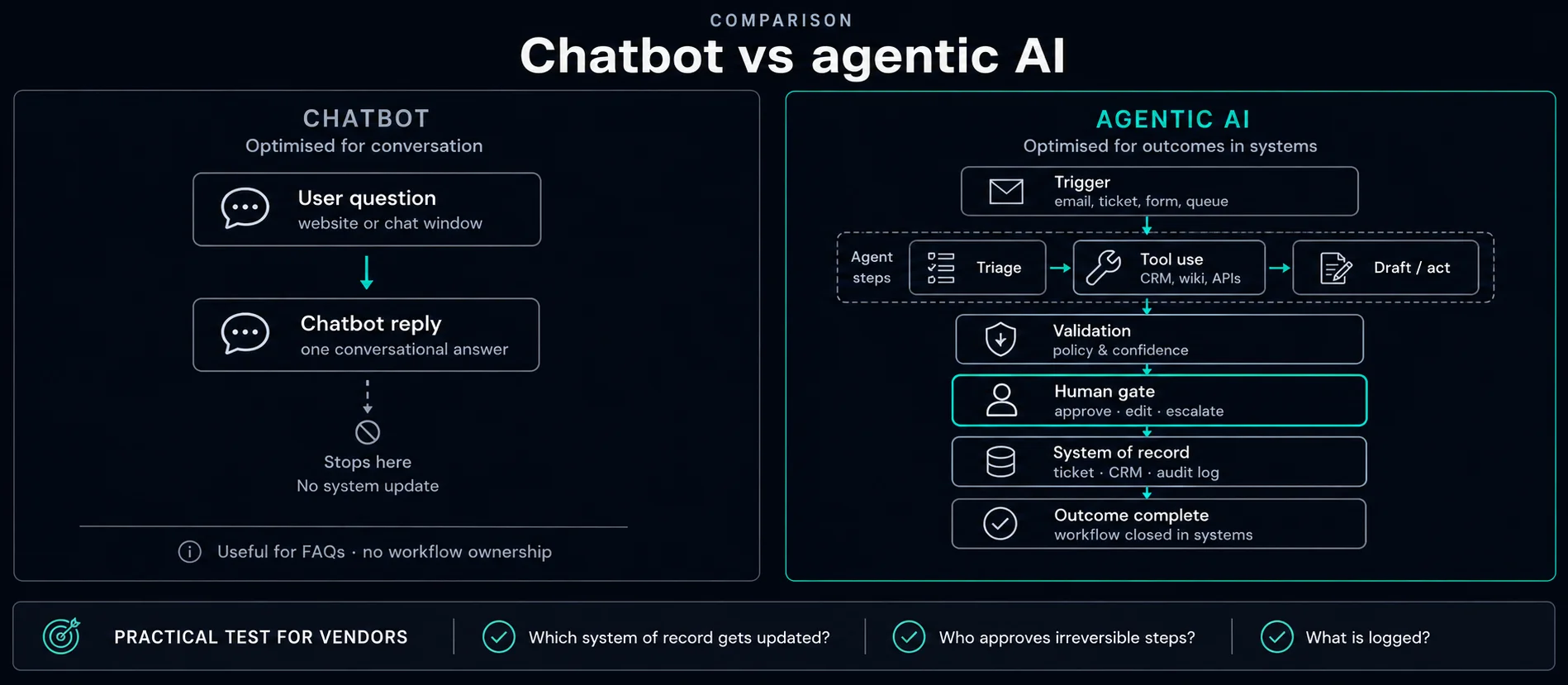
Diagram comparing passive chat use with governed agentic workflows integrated into business systems

The familiar climb

Most Midlands SME owners we speak to did not set out to build an AI strategy. They opened ChatGPT to draft an email, liked what came back, and used it for more — a tender summary here, a difficult customer reply there. Then someone mentioned Zapier, and quote requests started logging into a spreadsheet while Slack pinged on new leads. For a while, that feels like enough.

Then something breaks — usually not the tools, but the process underneath them. The assumption becomes “we need a cleverer prompt or one more Zap.” Sometimes that is true. Increasingly, it is a system ownership question instead.

Both platforms have added agent-style features — longer-running tasks, more connectors, goal-led automation. That raises the ceiling. It does not remove the wall when decisions need your rules, your accountability, and a record you can defend.

Three tiers

Ask · Connect · Own

A useful map for where familiar tools sit — and where engineered workflows start. Most estates climb tier 1 and 2 first. That is the right order.

TIER 1 ASK Chat AI — drafts, summarises, explores options in session e.g. ChatGPT, Copilot, Gemini TIER 2 CONNECT iPaaS and agents — linear and multi-step flows across apps e.g. Zapier, Power Automate, Make — THE WALL — many SMEs still stop here — even after agent upgrades TIER 3 OWN Engineered workflow — your rules, owners, and audit trail built for how your operation actually decides
Ask, Connect, Own. Chat and iPaaS both climbed a rung — the wall moved up with them. It did not disappear when decisions need your criteria and a defensible record.
The real gap

Not autonomy — ownership

Neither ChatGPT nor Zapier is short on capability. For a real operation, the gap is usually the same problem in three forms.

It does not know your version of normal

Generic AI reasons from what is typical across every business it has seen. Your rules are not public — which supplier delay is routine, which insurance clause is a red flag, what margin you need on a job this shape. That judgement lives in your team until you encode it deliberately.

You inherit a chain nobody built

ChatGPT, Zapier, a spreadsheet, and a Slack alert can work together — but each link was designed for a general audience, not as one accountable system. When step three of six fails quietly, there is often no owner because it was never anyone’s workflow to own.

There is no record of why

For client decisions, supplier contracts, tenders, or compliance steps, “the AI decided” is not an answer you can stand behind. Consumer platforms were not built around your process — so they rarely keep the structured evidence an auditor or bid review would ask for six months later.

Comparison

Configure vs engineer — at a glance

Three common layers UK SMEs reach for. None is “better” in isolation — the fit depends on who drives each run, what state you must keep, who can spot wrong outputs, and what happens when something is wrong.

Dimension ChatGPT / M365 Copilot Zapier / Power Automate Engineered workflow
Who drives each run A person opens chat or Copilot, reviews each output, decides what ships Trigger fires; steps run on a schedule or event with optional approval steps System runs on events, schedules, or queues — roles own exceptions
State between events Session and thread history; not a case queue for the whole operation Run history and task logs; limited cross-run case management Persistent cases, jobs, or queues with status, owners, and SLAs
System reach Connectors and plugins on your plan; best for drafting and retrieval Pre-built app connectors; strong when apps are on the platform Line-of-business APIs, files, bespoke UX, and hybrid integrations
Human approval Implicit — user is in the loop by design Approval steps where the platform supports them Named gates, role-based desks, rollback when automation is wrong
Factual errors and hallucinations Can produce plausible but wrong facts, figures, or citations; rarely signals uncertainty — a reviewer who knows the domain must catch errors Deterministic steps do not hallucinate; AI or agent steps inherit LLM risk; failures are often wrong field mapping or timeouts Retrieval on approved sources, schema checks, flags for missing data, and review on material fields — risk is constrained, not eliminated
Your rules and exceptions General reasoning; no durable model of your policies unless you engineer retrieval and gates around it Partial — templates and filters help; complex exception logic often becomes brittle Zaps Criteria encoded from how your team already decides; ambiguous cases routed to named owners
Audit and evidence Chat logs and enterprise retention policies Zap/task history; M365 compliance tooling on premium tiers Structured logs tied to cases — suitable for ISO-minded review
Accountability when it breaks You and your reviewers — the platform is not accountable for your outcomes Vendor support for the platform; you own the chain design and silent failures Named delivery owner; acceptance tests; scale-or-stop review built into the engagement
Built for your process General-purpose interface; your process adapts to the tool App templates and recipes; edge cases often need workarounds Workflow shaped around your queues, roles, and systems of record
Runs without someone watching No — unattended customer-facing actions need another layer Yes for supported linear flows within plan limits Yes — designed for operational reliability and exception paths
Cost at volume Per-seat licensing; cheap for interactive drafting Per-task or premium tiers; can climb with run volume Higher build cost; often better unit economics at sustained scale
Typical first use Draft emails, summarise documents, explore options in a meeting Form → CRM, notify Slack, copy rows between SaaS tools RFQ quoting, tender triage, finance exceptions, governed M365 ops

Hybrid estates are normal: Copilot for drafting, Power Automate for a linear handoff, and a small engineered service when a queue must survive across people and systems. Scroll the table horizontally if needed — the dimension column stays fixed. The question is which layer owns the operational truth, and who can catch confident wrong answers before they reach a customer or ERP.

Decision flow

Which path fits your workflow?

Three questions in order. A “yes” at step 1 or 2 usually means configure first — measure, then revisit.

Is a qualified person reviewing every material fact before it reaches a customer or system of record?

Yes → stop here

Configure — chat layer

Use ChatGPT Business/Enterprise or M365 Copilot. A human who can spot hallucinations leads each session and approves what ships.

No → step 2

Mistakes could pass unnoticed

Work runs on events or shared queues without someone in chat — or reviewers cannot reliably catch confident wrong answers.

Is it a mostly linear flow between apps your iPaaS already supports?

Yes → stop here

Configure — iPaaS

Start with Zapier or Power Automate. Validate retention, data boundaries, and approval steps on your plan before adding AI steps.

No → step 3

Gaps in connectors or ownership

The process spans LOB systems, files, or roles your iPaaS cannot own as one operation.

Do you need persistent queues, exception desks, unusual integrations, or operational SLAs?

Yes → engineer

Governed production operation

Engineer or hybrid. Build workflow with state, human gates, and acceptance tests. See our workflow automation service.

No / unclear

Stay on iPaaS for now

Measure for a few weeks. If queues or audit gaps persist, request a consultation.

Tier 1

Ask

Chat / Copilot — person approves every material action.

Tier 2

Connect

iPaaS — form to CRM, notify a channel, sync SaaS fields.

Tier 3

Own

Production slice from £4,950 / four weeks. How we work.

Worked examples

Same question, three answers

Concrete patterns we see on Midlands SME enquiries — not exhaustive, but useful when the matrix feels abstract.

Usually configure first

  • One-off tender summary — paste the ITT into ChatGPT or Copilot; a bid manager checks compliance language before reuse.
  • Website form → HubSpot contact — Zapier or Power Automate if both apps are on your plan and fields map cleanly.
  • Meeting notes → actions — Copilot in Teams or ChatGPT with your retention policy; owner assigns tasks manually.

Usually engineer (or hybrid)

  • RFQ inbox → priced quote → ERP handoff — persistent queue, drawing context, estimator sign-off. RFQ quoting pattern.
  • Shared mailbox triage with pricing guardrails — classify, route, draft — but nothing customer-facing sends without approval. Enquiry triage workflow.
  • Invoice coding exceptions — gather PDF and email context before a clerk posts to Sage or Xero. Invoice coding automation.
  • Tender appendix assembly — structured assistance with mandatory human review on compliance statements. Tender automation.
On the ground

When automation saves typing but not judgement

Take a fabrication shop handling RFQs most weeks — email, drawings, repeat customers. ChatGPT can draft a sensible first reply once someone pastes the enquiry. Zapier can file each message into a tracker.

Neither reliably tells you whether this quote is worth pursuing: current capacity, target customers, clause risk, realistic margin on a job this shape. A human re-checks every one — so the automation shortened admin, not the decision. An engineered path encodes your criteria, flags genuinely ambiguous cases, and logs what was checked and why. See our RFQ quoting pattern (reference design).

DUCT-TAPED CHAIN ChatGPT draft Zapier inbox Sheet log Slack alert ? no owner · no record of why ENGINEERED SYSTEM Intake Evaluate Decide Act against rules your team already uses AUDIT TRAIL — every step logged one system · one owner · full record
Two paths to the same outcome. One is tools you are holding together. The other is a workflow someone scoped, tested, and stands behind.
Warning signs

Signals you have outgrown configure-only

  1. You built a second system — a spreadsheet or shared doc — just to catch what the automation might have missed.
  2. Judgement calls in the process now outnumber pure data entry.
  3. A mistake would cost real money, a client relationship, or a compliance headache — not just an afternoon’s rework.
  4. More than one person is quietly “keeping an eye on” the automation, just in case.
  5. If someone asked why a particular call was made last Tuesday, nobody could answer from a single record.

When familiar tools are enough

ChatGPT (Business or Enterprise) fits interactive work: a person leads the session, checks each output, and decides what ships. Connectors and governed deployments can reach into approved systems — still with a human in the loop for material actions.

Zapier (including Agents on supported plans) fits linear workflows between apps it already integrates: trigger → steps → optional human approval → log. If your process is mostly “when X happens in app A, update app B”, start there.

Microsoft Power Automate and similar iPaaS tools play the same role inside M365-heavy estates. We configure these first when they meet the requirement — see the comparison matrix and decision flow above.

When to engineer beyond them

Move to a bespoke or hybrid production workflow when you need any of the following:

  • Persistent operational state — queues, cases, or jobs that survive across events and users
  • Event-driven execution — schedules, webhooks, or system alerts that run without someone opening a chat window
  • Non-standard systems — line-of-business tools, files, or APIs Zapier does not cover cleanly
  • Custom permissions and UX — role-based views, exception desks, or approval surfaces your team already uses
  • Exception handling — structured queues, SLAs, and rollback when automation is wrong
  • Material facts without a reliable reviewer — pricing, compliance, or ERP fields where hallucinations or gaps must be caught by structure, not hope
  • Unit economics at scale — per-run platform fees that exceed the cost of an in-house service

That is the boundary for our workflow automation and agentic AI consultancy work.

How SyncBridge engages

We start with the operational decision you need to improve, not a technology preference. Most engagements begin with a four-week production slice from £4,950: one workflow, one primary system, one human approval point, baseline metrics, and a scale-or-stop review. See how we work for what is included and quoted separately.

Examples on our solutions index illustrate the method. They are reference designs and demonstrations — not the limits of what we build.

ChatGPT and Zapier get most SMEs further than off-the-shelf tools usually do. When you hit the wall, the fix is rarely a cleverer prompt — it is owning the process as a system someone can explain and audit.

Frequently asked questions

Should we use ChatGPT or hire a consultancy?

Use ChatGPT when work is interactive and user-led. Engage SyncBridge when the operation must run as a governed system of record with measurable acceptance tests.

Is Zapier enough for AI workflow automation?

Often yes for supported linear flows. Engineer beyond it when state, integrations, or reliability requirements exceed what the platform can own cleanly.

Can we use ChatGPT and Zapier together?

Yes — many estates use both. The gap appears when neither layer owns persistent queues, exception handling, and SLAs as one operation. That is when a small engineered service (or hybrid) is worth scoping.
Start here

Discuss your architecture choice

Request a consultation to map one workflow, baseline metrics, and whether configure or engineer is the right call.

Request AI Consultation